Proof of concepts

  • AI Prompt Engineer

    AI Prompt Engineer

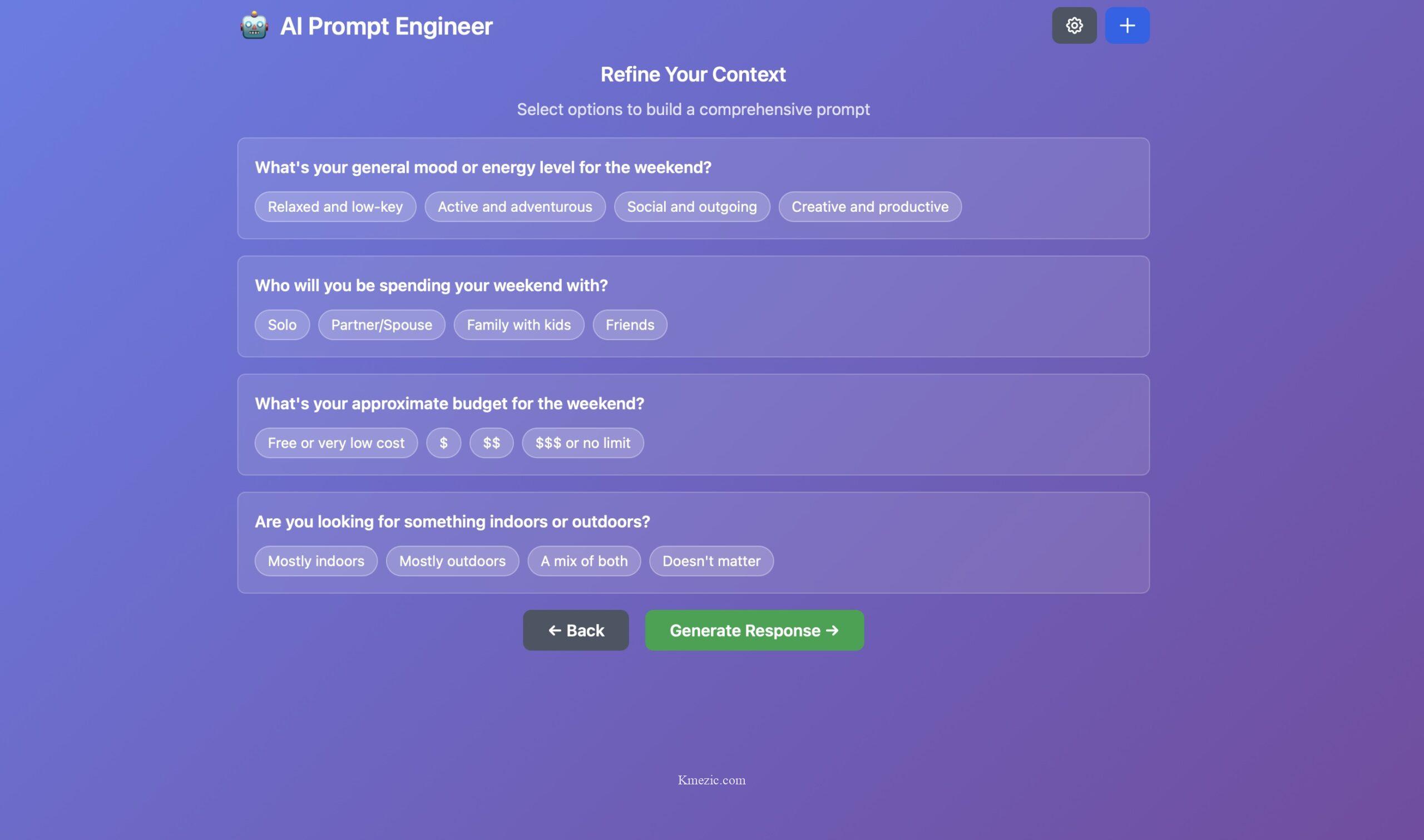
    AI Prompt Engineer is a modern web-based tool for building, refining, and engineering prompts for large language models (LLMs) like OpenAI GPT and Google Gemini. It provides a guided, wizard-style interface to help users craft comprehensive prompts, experiment with model parameters, and interact with AI in a structured way.

    Demo

    https://rawcdn.githack.com/milankmezic/AIPromptEngineer/0e730672df7d033dc85c47b434fefcc440599cb8/index.html

    Features

    • Wizard-based Prompt Engineering: Step-by-step interface to clarify your intent and build detailed prompts.
    • OpenAI & Gemini API Support: Easily configure your API key, model, and endpoint.
    • Parameter Tuning: Adjust temperature, max tokens, top-p, frequency/presence penalties, and more.
    • Dark Mode: Toggle between light and dark themes.
    • Markdown Rendering: AI responses are rendered with full markdown support.
    • Speech-to-Text: Use your microphone to dictate messages (Web Speech API supported browsers).
    • Local Settings Storage: All settings are saved in your browser for convenience.
    • Automatic Follow-up Suggestions: After each AI response, the system automatically generates relevant follow-up actions you can click to continue the conversation.
    • Auto-focus: Input boxes automatically receive focus for seamless typing experience.
    • Clickable Header: Click the header with robot emoji to return to the first page anytime.

    Getting Started

    1. Clone the repository:

      git clone https://github.com/milankmezic/AIPromptEngineer.git
      cd AIPromptEngineer
    2. Open the App:

      • Simply open index.html in your web browser (Chrome recommended).
      • No build step or server required.
    3. Configure API Settings:

      • Click the settings (gear) icon.
      • Enter your OpenAI or Gemini API key, model, and (optionally) base URL.
      • Adjust parameters as needed.
    4. Start Engineering Prompts:

      • Click “Get Started” and follow the wizard to build your prompt.
      • Review, refine, and send prompts to the AI.
      • Use the chat interface for follow-up questions and iterative refinement.
      • Click on automatically generated follow-up suggestions to continue the conversation.

    Parameters and URL Prefill

    You can prefill the API key, model, and base URL fields by passing them as URL parameters when opening the app. This is useful for sharing links or automating configuration.

    • key: Your API key (e.g., OpenAI or Gemini)
    • model: The model name (e.g., gpt-4, google/gemini-2.5-flash-lite)
    • url: The base API URL (e.g., https://api.openai.com/v1)

    Example:

    https://yourdomain.com/index.html?key=YOUR_API_KEY&model=gpt-4&url=https://api.openai.com/v1
    

    When you open the app with these parameters, the corresponding fields will be pre-filled automatically.

    Recent Updates

    • Automatic Follow-up Suggestions: The AI now generates contextual follow-up actions after each response
    • Enhanced UX: Auto-focus on input fields and clickable header navigation
    • Improved Defaults: Set to use google/gemini-2.5-flash-lite by default
    • Streamlined Interface: Removed stream option for cleaner settings panel
    • GitHub Integration: Direct link to latest version on GitHub from splash screen

    Screenshots

    Add screenshots or a demo GIF here to showcase the UI and workflow.

    Demo

    ๐ŸŽฅ Watch the demo video: AI Prompt Engineer Demo

    Requirements

    • Modern web browser (Chrome, Edge, Firefox, Safari)
    • OpenAI or Gemini API key (for actual AI responses)

    Security Note

    • API keys are stored locally in your browser and never sent to any server except the configured AI endpoint.
    • Always keep your API keys secure and do not share them.

    License

    GNU AFFERO GENERAL PUBLIC LICENSE. See LICENSE for details.

    Credits


    Contributions, issues, and feature requests are welcome!
  • AI Teleprompter

    AI Teleprompter

    A modern, intelligent teleprompter application that uses AI-powered speech recognition to follow your speech in real-time.

    ๐Ÿ“บ AI Teleprompter

    Watch on YouTube

    A modern, intelligent teleprompter application that uses AI-powered speech recognition to follow your speech in real-time. Built with vanilla HTML, CSS, and JavaScript for maximum compatibility and performance.

    โœจ Features

    ๐ŸŽค Smart Speech Recognition

    • Real-time speech-to-text with Web Speech API
    • Intelligent word matching with backward and forward search
    • Automatic highlighting of current word position
    • Smart error recovery and phrase recognition

    ๐ŸŽจ Visual Feedback System

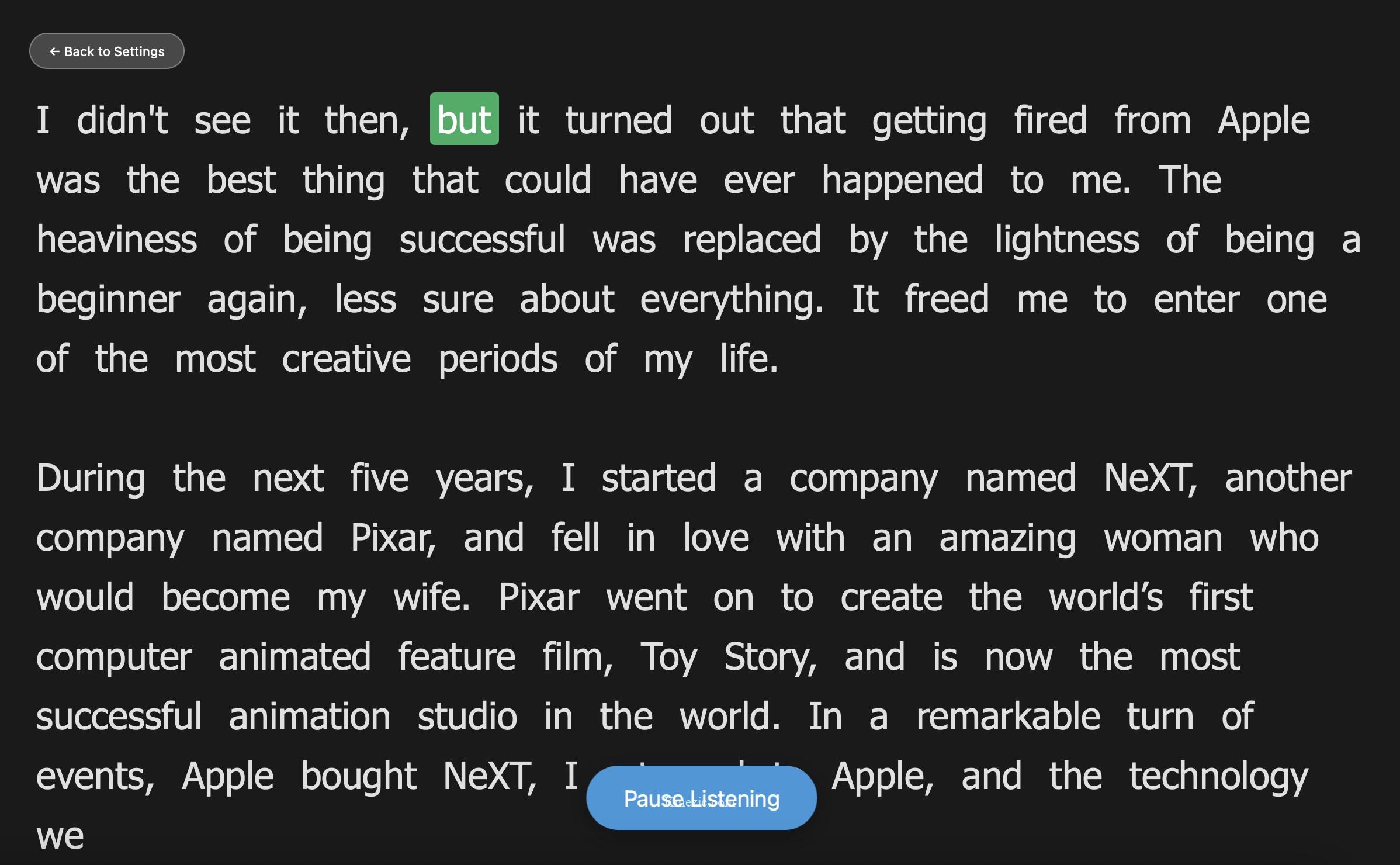
    • Green highlighting for current word
    • Red highlighting for missed words
    • No highlighting for mismatched words (counts as correct)
    • Toggleable highlight system in settings

    ๐Ÿ› ๏ธ Customizable Settings

    • Theme Selection: Light and dark mode with system preference detection
    • Scroll Positioning: Top, center, or bottom word positioning
    • Word Highlights: Toggle visual feedback on/off
    • Local Storage: All settings and scripts are saved automatically

    ๐Ÿ“Š Performance Analytics

    • Comprehensive speech analysis when session completes
    • Accuracy percentage calculation
    • Reading speed (words per minute)
    • Total reading time
    • Detailed statistics on correct vs missed words

    ๐ŸŽฏ Professional Features

    • Continuous Smooth Scrolling: Keeps text flowing naturally
    • Line Break Preservation: Maintains original script formatting
    • Pause/Resume: Full control over speech recognition
    • Responsive Design: Works on desktop, tablet, and mobile
    • Manual Scroll Override: Take control when needed

    ๐Ÿš€ Getting Started

    Prerequisites

    • Modern web browser with Web Speech API support (Chrome, Edge, Safari)
    • Microphone access for speech recognition

    Installation

    1. Clone the repository

      git clone https://github.com/milankmezic/AITeleprompter.git
      cd AITeleprompter
    2. Open in browser

      # Simply open index.html in your web browser
      open index.html
      # or
      python -m http.server 8000  # For local server
    3. Start using

      • No build process required!
      • No dependencies to install!
      • Works offline after initial load!

    ๐Ÿ“– Usage

    Quick Start

    1. Launch the application by opening index.html
    2. Configure your settings (theme, scroll position, highlights)
    3. Enter your script in the large text area
    4. Start the teleprompter and begin speaking
    5. View your performance analysis when complete

    Advanced Features

    Script Formatting

    • Supports line breaks and paragraph structure
    • Maintains original text formatting
    • Works with poetry, speeches, and structured content

    Speech Recognition Tips

    • Speak clearly and at a natural pace
    • The system adapts to your speaking speed
    • Pause/resume functionality for breaks
    • Smart recovery from speech recognition errors

    Performance Optimization

    • Uses intelligent word matching algorithms
    • Backward search up to entire script history
    • Forward search up to 6 words ahead
    • Real-time statistics tracking

    ๐Ÿ› ๏ธ Technical Details

    Built With

    • HTML5 – Semantic structure and Web Speech API
    • CSS3 – Modern styling with CSS Grid and Flexbox
    • Vanilla JavaScript – No frameworks or dependencies
    • Web Speech API – Real-time speech recognition
    • Local Storage – Persistent settings and scripts

    Browser Compatibility

    • โœ… Chrome (Recommended)
    • โœ… Edge
    • โœ… Safari
    • โš ๏ธ Firefox (Limited Web Speech API support)

    Performance Features

    • Lazy Loading – Optimized resource usage
    • Local Storage – Fast settings persistence
    • Real-time Processing – Minimal latency speech recognition
    • Responsive Design – Adapts to any screen size

    ๐Ÿ“ Project Structure

    AITeleprompter/
    โ”œโ”€โ”€ index.html          # Main application file
    โ”œโ”€โ”€ README.md           # Project documentation
    โ””โ”€โ”€ LICENSE            # MIT license file
    

    ๐Ÿค Contributing

    Contributions are welcome! Please feel free to submit a Pull Request.

    Development Guidelines

    1. Fork the repository
    2. Create a feature branch (git checkout -b feature/AmazingFeature)
    3. Commit your changes (git commit -m 'Add some AmazingFeature')
    4. Push to the branch (git push origin feature/AmazingFeature)
    5. Open a Pull Request

    Feature Requests

    • ๐ŸŽต Audio cue support
    • ๐Ÿ“ฑ Mobile app version
    • ๐ŸŒ Multi-language support
    • ๐Ÿ“ค Export functionality
    • ๐ŸŽฅ Video recording integration

    ๐Ÿ“ License

    This project is licensed under the GNU AFFERO GENERAL – see the LICENSE file for details.

    ๐Ÿ‘จโ€๐Ÿ’ป Author

    Milan Kmezic

    ๐Ÿ™ Acknowledgments

    • Built with the Web Speech API
    • Inspired by professional teleprompter applications
    • Thanks to the open source community for inspiration and feedback

    ๐Ÿ“ˆ Roadmap

    • [ ] Font Size Control – Adjustable text size for better readability
    • [ ] External Script Loading – Load scripts from URLs or external sources
    • [ ] Detailed Analytics – Enhanced performance metrics and speech patterns analysis

    ๐Ÿ› Bug Reports

    If you find a bug, please create an issue with:

    • Browser version and type
    • Steps to reproduce
    • Expected vs actual behavior
    • Screenshots if applicable

    โญ Support

    If you find this project helpful, please consider:

    • โญ Starring the repository
    • ๐Ÿ› Reporting bugs and issues
    • ๐Ÿ’ก Suggesting new features
    • ๐Ÿค Contributing to development

    Built with โค๏ธ for speakers, presenters, and content creators everywhere.

  • AI PDF PII Redactor

    AI PDF PII Redactor

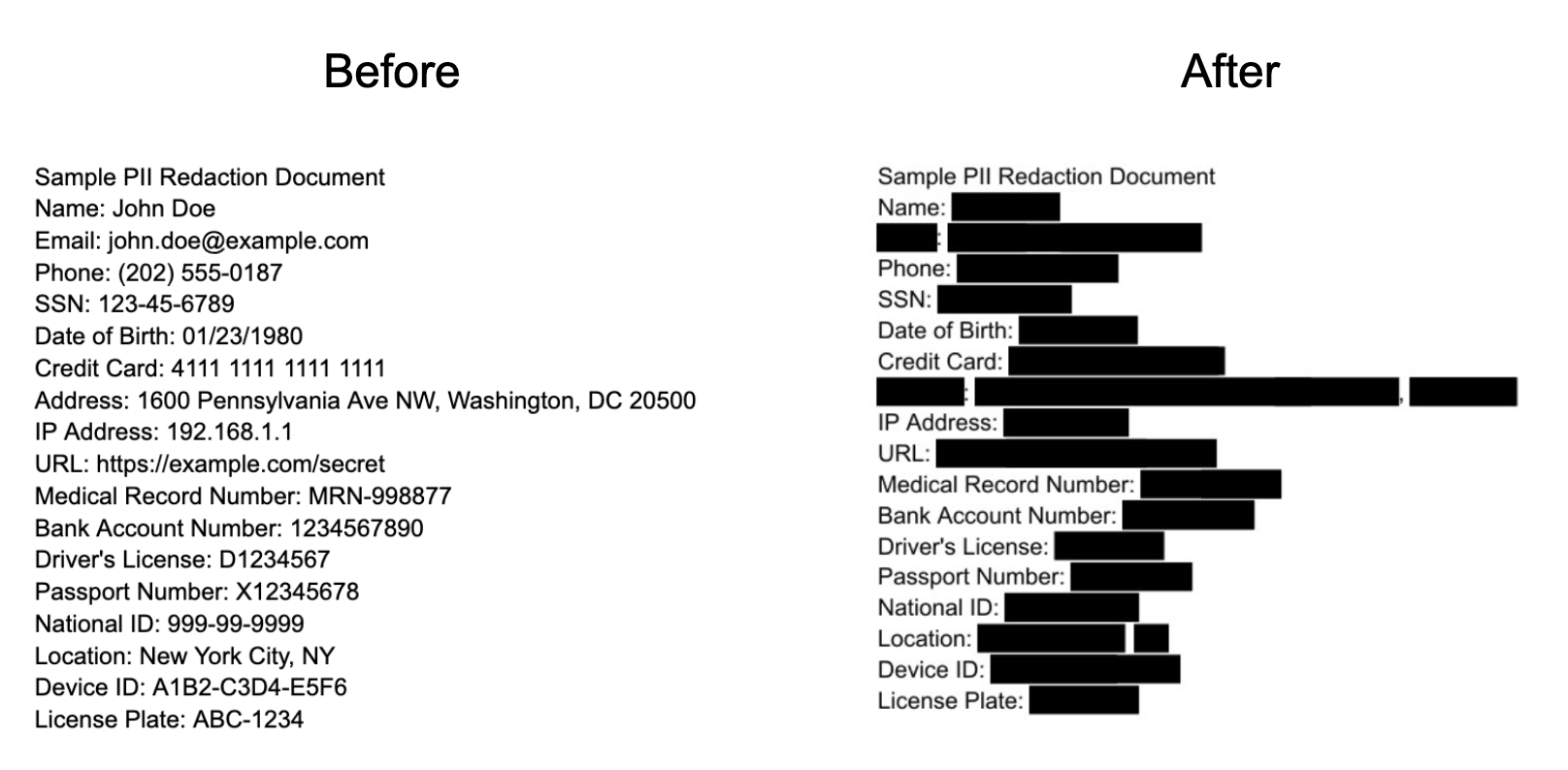
    PDF PII Redactor is a web tool that uses AI to detect and redact Personally Identifiable Information from PDF documents..

    ๐Ÿ”’ PDF PII Redactor – Proof of Concept

    Demonstration tool for exploring AI-powered PDF redaction.

    PDF PII Redactor is a proof of concept that uses AI to detect and redact Personally Identifiable Information (PII) from PDF documents. Built with Microsoft Presidio and designed for local processing, it is intended for testing, demonstration, and educational use only.

    Why Try PDF PII Redactor?

    • AI-Powered Detection: Uses Microsoft Presidio to identify common PII
    • Local-First Processing: Your data stays on your machine
    • Redaction Demo: Shows how black box redactions can be applied
    • Quick Results: Process documents in seconds
    • Open Source: Explore, fork, and adapt for your own research

    Disclaimer: This is a proof of concept. No guarantees of accuracy, completeness, or compliance. Not intended for production or critical use. Users are responsible for verifying all results.

    โœจ Features

    • ๐Ÿ” Intelligent PII Detection: Automatically identifies names, addresses, phone numbers, emails, and other sensitive data
    • ๐Ÿ”’ Secure Processing: All processing happens locally or in secure cloud environments
    • ๐Ÿ“„ Professional Redaction: Clean, professional redaction with clear markers and audit trails
    • โšก Easy to Use: Simple web interface – upload PDF, process, download redacted version
    • ๐Ÿ›ก๏ธ Privacy First: No data storage or transmission to third parties

    ๐ŸŽฏ What Gets Redacted

    • Personal Information: Names, addresses, phone numbers, emails
    • Financial Data: Credit card numbers, bank account details
    • Medical Information: Patient IDs, diagnoses, treatment details
    • Government IDs: Social Security numbers, passport numbers
    • Business Data: Trade secrets, proprietary information

    ๐Ÿš€ Quick Start

    Prerequisites

    • Python 3.8 or higher
    • Tesseract OCR (for scanned documents)

    Installation

    1. Clone the repository

      git clone https://github.com/milankmezic/pdf-pii-redaction.git
      cd pdf-pii-redaction
    2. Create a virtual environment

      python -m venv venv
      source venv/bin/activate  # On Windows: venv\Scripts\activate
    3. Install dependencies

      pip install -r requirements.txt
    4. Install Tesseract OCR (for scanned PDF support)

      macOS:

      brew install tesseract

      Ubuntu/Debian:

      sudo apt-get install tesseract-ocr

      Windows: Download from GitHub

    5. Run the application

      streamlit run app.py
    6. Open your browser Navigate to http://localhost:8501

    ๐Ÿ“– Usage

    1. Upload PDF: Click “Choose a PDF file” and select your document
    2. Accept Disclaimer: Read and accept the proof of concept disclaimer
    3. Process: Click “๐Ÿ” Detect and Redact PII” to start processing
    4. Review Results: See detected PII entities and redaction preview
    5. Download: Click “๐Ÿ“ฅ Download Redacted PDF” to get your secure document

    ๐Ÿ› ๏ธ Technical Details

    Architecture

    • Frontend: Streamlit web interface
    • Text Extraction: pdfplumber for accurate text positioning
    • OCR: pytesseract for scanned document support
    • PII Detection: Microsoft Presidio AI engine
    • PDF Processing: PyMuPDF (fitz) for redaction operations

    Security Features

    • Local Processing: Documents processed in memory, not stored
    • No Data Persistence: Files deleted immediately after processing
    • Secure Redaction: Professional-grade PDF redaction with metadata cleanup
    • Audit Trails: Detailed logs of all redactions for compliance

    ๐Ÿ“‹ Requirements

    streamlit>=1.28.0
    PyPDF2>=3.0.0
    python-dotenv>=1.0.0
    requests>=2.31.0
    Pillow>=9.5.0
    PyMuPDF>=1.23.0
    presidio-analyzer>=2.2.32
    presidio-anonymizer>=2.2.32
    pdfplumber>=0.10.3
    pytesseract
    

    ๐Ÿ”ง Configuration

    Environment Variables

    Create a .env file in the project root:

    # Optional: Custom Tesseract path (if not in system PATH)
    TESSERACT_CMD=/usr/local/bin/tesseract

    Customization

    • Detection Sensitivity: Modify detect_pii() function to adjust detection thresholds
    • Redaction Style: Customize redaction appearance in redact_pdf_with_pii()
    • Supported Languages: Add language support in Presidio configuration

    ๐Ÿงช Testing

    Run the test suite:

    python test_setup.py

    ๐Ÿ“Š Performance

    • Processing Speed: ~2-5 seconds per page (depending on content)
    • File Size: Supports PDFs up to 50MB
    • Memory Usage: Minimal – processes files in memory
    • Accuracy: High detection rate for common PII types

    ๐Ÿšจ Important Disclaimer

    This is a PROOF OF CONCEPT service and is NOT INTENDED FOR PRODUCTION USE.

    • No warranties provided
    • Users responsible for verifying results
    • Not suitable for critical applications without manual review
    • Educational and testing purposes only

    ๐Ÿค Contributing

    1. Fork the repository
    2. Create a feature branch (git checkout -b feature/amazing-feature)
    3. Commit your changes (git commit -m 'Add amazing feature')
    4. Push to the branch (git push origin feature/amazing-feature)
    5. Open a Pull Request

    ๐Ÿ“ License

    See the LICENSE file for details.

    ๐Ÿ†˜ Support

    For questions, issues, or feature requests:

    • Issues: Use the GitHub Issues page
    • Documentation: Check the code comments and this README
    • Security: Report security issues privately

    ๐Ÿ™ Acknowledgments

    • Microsoft Presidio: PII detection engine
    • pdfplumber: PDF text extraction
    • PyMuPDF: PDF processing and redaction
    • Streamlit: Web application framework

    ๐Ÿ“… Version History

    Version 2.1.0 – Enhanced File Browser (Latest)

    December 2024

    ๐Ÿ†• New Features:

    • ๐Ÿ“ Interactive Directory Browser: Browse local directories with dropdown navigation
    • ๐Ÿ“Š Multi-File Selection: Select multiple PDF files using interactive dataframes
    • ๐Ÿ”— URL Parameter Support: Bookmarkable URLs that remember current directory (?dir=/path/to/folder)
    • โšก Auto-Navigation: Automatic directory changes without manual “Go” button clicks
    • ๐ŸŒ URL Processing: Direct processing of PDF files from web URLs
    • ๐Ÿ“‹ Batch Processing: Process multiple selected files in one operation

    ๐Ÿ”ง Interface Improvements:

    • File browser shows file size, modification dates, and organized navigation
    • Select All / Clear All buttons for quick file selection
    • Enhanced sidebar with three processing modes: Browse, URL, Upload
    • Streamlined information flow with details moved to disclaimer page
    • Real-time URL updates for easy bookmarking and sharing

    ๐ŸŽฏ User Experience:

    • One-click directory navigation via dropdown
    • Persistent directory state across browser sessions
    • Improved visual feedback and progress indicators
    • Cleaner main interface focused on functionality

    Version 1.0.0 – Initial Release

    Earlier 2024

    Core Features:

    • Single PDF file upload and processing
    • AI-powered PII detection using Microsoft Presidio
    • Local document processing for privacy
    • Professional PDF redaction with audit trails
    • OCR support for scanned documents
    • Streamlit web interface

    ๐Ÿ“ˆ Roadmap

    • [ ] Multi-language support
    • [ ] Batch processing
    • [ ] Custom PII patterns
    • [ ] API endpoint
    • [ ] Docker containerization
    • [ ] Cloud deployment options

    Made with โค๏ธ for privacy and security

    Transform your document workflow. Protect your privacy. Ensure compliance.

  • AI Augmented Staff – Empowering Teams with Practical AI Skills

    AI Augmented Staff – Empowering Teams with Practical AI Skills

    One of the most rewarding projects Iโ€™ve led recently was an organization-wide initiative called AI-Augmented Staff โ€” designed to bring the power of modern AI tools directly into employeesโ€™ day-to-day workflows.

    The goal was simple: make AI useful, not theoretical.

    We delivered hands-on training across departments, showing staff how to use generative AI to accelerate research, automate repetitive tasks, summarize meetings, draft communications, and more. To make adoption seamless, I created a click-and-run prompt libraryโ€”a curated collection of ready-made AI prompts tailored to real job scenarios.

    From HR to finance, project teams to executives, everyone left with actionable skillsโ€”and the confidence to apply AI immediately.

    Outcome: A more empowered, AI-literate workforce ready to work smarter and lead with innovation.

  • AI Phone Support Agent

    AI Phone Support Agent

    Customers expect immediate, naturalโ€language assistanceโ€”yet staffing every call center 24/7 is costly. To demonstrate whatโ€™s possible, I built an AI Phone Support Agent prototype for a federal agency that handles up to 80% of common inquiries without human intervention. Callers simply dial in, ask their question, and the AI responds conversationally.

    Tech Stack & Roles

    • Twilio Voice
      • Receives inbound calls and streams realโ€‘time transcription to PHP
      • Plays back AIโ€‘generated speech via TwiML <Say>
    • PHP Backend
      • Handles Twilioโ€™s transcription webhook
      • Forwards each transcript (with call ID) to Flowiseโ€™s REST endpoint
      • Returns TwiML containing <Say> with the AIโ€™s response
    • Flowise (Open Source)
      • Document Loader: Ingests agency FAQ PDFs/Markdown into an embeddings index
      • Retriever Node: Fetches topโ€‘k relevant passages for each query
      • LLM Node: Wraps context and user utterance into a prompt for ChatGPT
    • OpenAI ChatGPT API
      • Generates concise, policyโ€‘accurate text answers
  • AI Employee Handbook

    AI Employee Handbook

    In every growing organization, onboarding and knowledgeโ€sharing can become a headache: policies get buried in PDFs, and people waste time digging for answers. To solve this, I built an AI Employee Handbookโ€”a chatbot that gives instant, conversational access to company policies, benefits, and culture.

    Key highlights:

    • Python back end
    • MySQL request queue
    • ChatGPT LLM for naturalโ€‘language understanding
    • Flowise for an agentic, Retrievalโ€‘Augmented Generation (RAG) pipeline with memory and a simple web UI

    Motivation

    • Faster onboarding: New hires can ask โ€œWhatโ€™s our vacation policy?โ€ instead of emailing HR.
    • Consistent answers: AI ensures everyone sees the same upโ€‘toโ€‘date policy.
    • Reduced support load: HR spends less time answering repetitive questions.