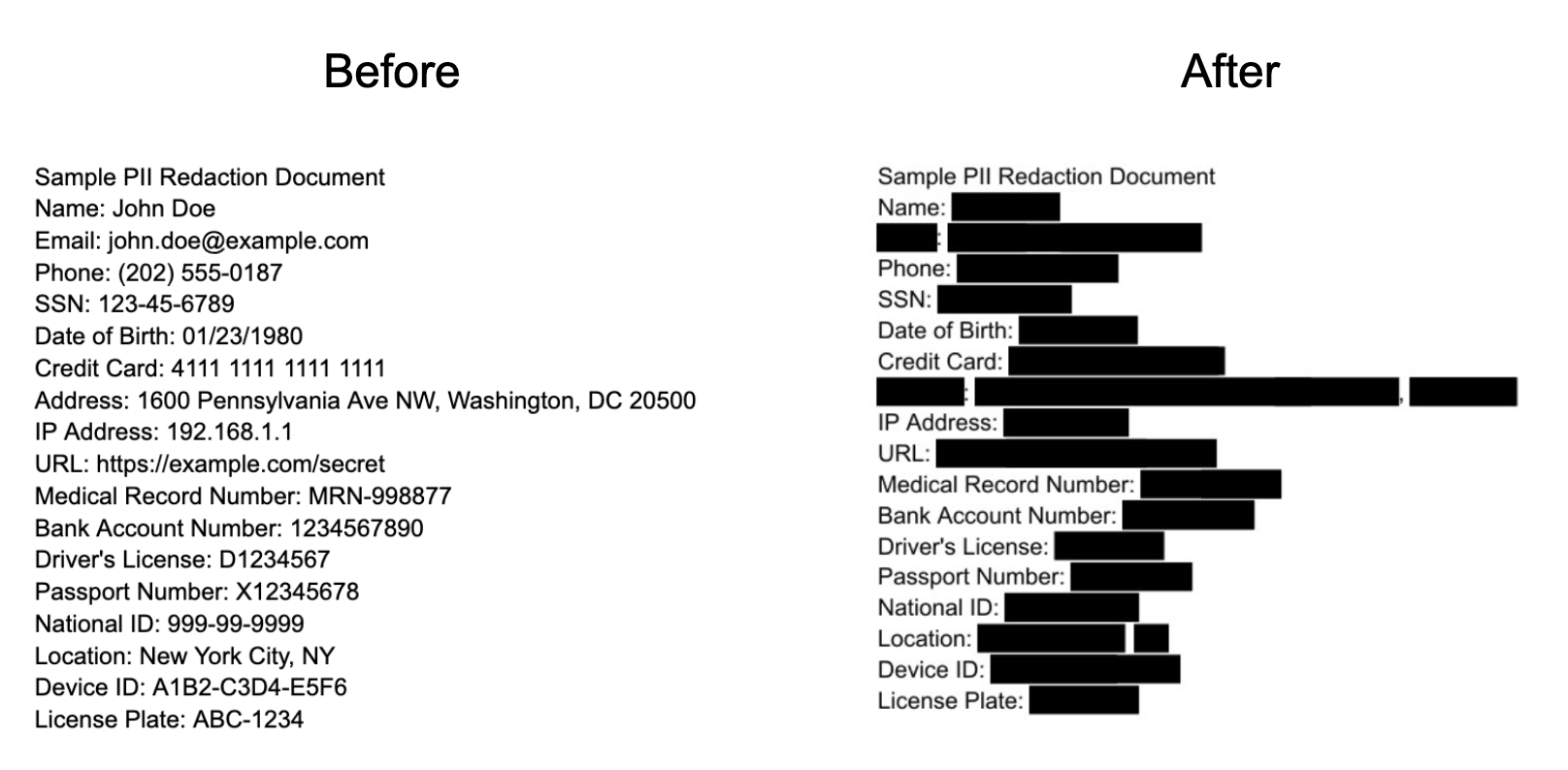
PDF PII Redactor is a web tool that uses AI to detect and redact Personally Identifiable Information from PDF documents..
Demonstration tool for exploring AI-powered PDF redaction.
PDF PII Redactor is a proof of concept that uses AI to detect and redact Personally Identifiable Information (PII) from PDF documents. Built with Microsoft Presidio and designed for local processing, it is intended for testing, demonstration, and educational use only.
Why Try PDF PII Redactor?
- AI-Powered Detection: Uses Microsoft Presidio to identify common PII
- Local-First Processing: Your data stays on your machine
- Redaction Demo: Shows how black box redactions can be applied
- Quick Results: Process documents in seconds
- Open Source: Explore, fork, and adapt for your own research
Disclaimer: This is a proof of concept. No guarantees of accuracy, completeness, or compliance. Not intended for production or critical use. Users are responsible for verifying all results.
- 🔍 Intelligent PII Detection: Automatically identifies names, addresses, phone numbers, emails, and other sensitive data
- 🔒 Secure Processing: All processing happens locally or in secure cloud environments
- 📄 Professional Redaction: Clean, professional redaction with clear markers and audit trails
- ⚡ Easy to Use: Simple web interface – upload PDF, process, download redacted version
- 🛡️ Privacy First: No data storage or transmission to third parties
- Personal Information: Names, addresses, phone numbers, emails
- Financial Data: Credit card numbers, bank account details
- Medical Information: Patient IDs, diagnoses, treatment details
- Government IDs: Social Security numbers, passport numbers
- Business Data: Trade secrets, proprietary information
- Python 3.8 or higher
- Tesseract OCR (for scanned documents)
-
Clone the repository
git clone https://github.com/milankmezic/pdf-pii-redaction.git cd pdf-pii-redaction -
Create a virtual environment
python -m venv venv
source venv/bin/activate  # On Windows: venv\Scripts\activate
-
Install dependencies
pip install -r requirements.txt
-
Install Tesseract OCR (for scanned PDF support)
macOS:
brew install tesseract
Ubuntu/Debian:
sudo apt-get install tesseract-ocr
Windows: Download from GitHub
-
Run the application
streamlit run app.py
-
Open your browser Navigate to
http://localhost:8501
- Upload PDF: Click “Choose a PDF file” and select your document
- Accept Disclaimer: Read and accept the proof of concept disclaimer
- Process: Click “🔍 Detect and Redact PII” to start processing
- Review Results: See detected PII entities and redaction preview
- Download: Click “📥 Download Redacted PDF” to get your secure document
- Frontend: Streamlit web interface
- Text Extraction: pdfplumber for accurate text positioning
- OCR: pytesseract for scanned document support
- PII Detection: Microsoft Presidio AI engine
- PDF Processing: PyMuPDF (fitz) for redaction operations
- Local Processing: Documents processed in memory, not stored
- No Data Persistence: Files deleted immediately after processing
- Secure Redaction: Professional-grade PDF redaction with metadata cleanup
- Audit Trails: Detailed logs of all redactions for compliance
streamlit>=1.28.0
PyPDF2>=3.0.0
python-dotenv>=1.0.0
requests>=2.31.0
Pillow>=9.5.0
PyMuPDF>=1.23.0
presidio-analyzer>=2.2.32
presidio-anonymizer>=2.2.32
pdfplumber>=0.10.3
pytesseract
Create a .env file in the project root:
# Optional: Custom Tesseract path (if not in system PATH)
TESSERACT_CMD=/usr/local/bin/tesseract-
Detection Sensitivity: Modify
detect_pii()function to adjust detection thresholds -
Redaction Style: Customize redaction appearance in
redact_pdf_with_pii() - Supported Languages: Add language support in Presidio configuration
Run the test suite:
python test_setup.py- Processing Speed: ~2-5 seconds per page (depending on content)
- File Size: Supports PDFs up to 50MB
- Memory Usage: Minimal – processes files in memory
- Accuracy: High detection rate for common PII types
This is a PROOF OF CONCEPT service and is NOT INTENDED FOR PRODUCTION USE.
- No warranties provided
- Users responsible for verifying results
- Not suitable for critical applications without manual review
- Educational and testing purposes only
- Fork the repository
- Create a feature branch (
git checkout -b feature/amazing-feature) - Commit your changes (
git commit -m 'Add amazing feature') - Push to the branch (
git push origin feature/amazing-feature) - Open a Pull Request
See the LICENSE file for details.
For questions, issues, or feature requests:
- Issues: Use the GitHub Issues page
- Documentation: Check the code comments and this README
- Security: Report security issues privately
- Microsoft Presidio: PII detection engine
- pdfplumber: PDF text extraction
- PyMuPDF: PDF processing and redaction
- Streamlit: Web application framework
December 2024
🆕 New Features:
- 📁 Interactive Directory Browser: Browse local directories with dropdown navigation
- 📊 Multi-File Selection: Select multiple PDF files using interactive dataframes
-
🔗 URL Parameter Support: Bookmarkable URLs that remember current directory (
?dir=/path/to/folder) - ⚡ Auto-Navigation: Automatic directory changes without manual “Go” button clicks
- 🌐 URL Processing: Direct processing of PDF files from web URLs
- 📋 Batch Processing: Process multiple selected files in one operation
🔧 Interface Improvements:
- File browser shows file size, modification dates, and organized navigation
- Select All / Clear All buttons for quick file selection
- Enhanced sidebar with three processing modes: Browse, URL, Upload
- Streamlined information flow with details moved to disclaimer page
- Real-time URL updates for easy bookmarking and sharing
🎯 User Experience:
- One-click directory navigation via dropdown
- Persistent directory state across browser sessions
- Improved visual feedback and progress indicators
- Cleaner main interface focused on functionality
Earlier 2024
Core Features:
- Single PDF file upload and processing
- AI-powered PII detection using Microsoft Presidio
- Local document processing for privacy
- Professional PDF redaction with audit trails
- OCR support for scanned documents
- Streamlit web interface
- [ ] Multi-language support
- [ ] Batch processing
- [ ] Custom PII patterns
- [ ] API endpoint
- [ ] Docker containerization
- [ ] Cloud deployment options
Made with ❤️ for privacy and security
Transform your document workflow. Protect your privacy. Ensure compliance.